
Why AI Automation Is Important for Business

Artificial intelligence has moved from an experimental technology to a core part of how competitive businesses operate. Automation powered by AI is no longer a “nice to have” for large tech companies. It’s becoming a baseline expectation across industries, from retail and manufacturing to healthcare and finance. Here’s why it matters, and what it actually changes for a business.

1. It Frees Up Human Time for Higher-Value Work

Every business has repetitive, rules-based tasks: data entry, invoice processing, scheduling, responding to common customer questions, sorting through resumes, generating reports. AI automation handles this category of work reliably and around the clock, which means employees spend less time on busywork and more time on strategy, creativity, and relationship-building — the things machines still can’t do well.

Example: A customer support team that used to manually triage every incoming ticket can use an AI system to categorize, prioritize, and even resolve simple requests, letting human agents focus on complex or sensitive issues.

2. It Reduces Operational Costs

Labor is one of the largest expenses for most businesses. Automating repetitive processes can significantly cut costs tied to manual labor, human error, and inefficient workflows. This doesn’t necessarily mean replacing people; often it means doing more with the same team, or scaling operations without proportionally scaling headcount.

3. It Improves Accuracy and Consistency

Humans get tired, distracted, and make mistakes, especially with repetitive tasks. AI systems don’t. Whether it’s processing financial transactions, checking documents for compliance, or managing inventory levels, automation reduces error rates and ensures the same standard is applied every single time.

4. It Enables Faster Decision-Making

AI can process and analyze massive amounts of data far faster than any human team. This means businesses can:

  • Detect fraud in real time
  • Forecast demand more accurately
  • Identify emerging market trends before competitors
  • Personalize customer experiences at scale

Speed matters. A business that can act on data in minutes instead of weeks has a real competitive edge.

5. It Scales Without Breaking

Manual processes tend to break down as a business grows — more customers, more transactions, more support requests, more complexity. AI automation is built to scale. A chatbot can handle ten conversations or ten thousand with the same consistency, something that’s simply not possible with a manual, human-only process.

6. It Improves the Customer Experience

Customers increasingly expect fast, personalized, always-available service. AI-powered tools like chatbots, recommendation engines, and predictive support systems allow businesses to meet these expectations without needing an equally large support staff.

7. It Creates a Competitive Advantage

Businesses that adopt AI automation early tend to move faster, operate leaner, and adapt more quickly to market changes. As more competitors adopt these tools, businesses that delay risk falling behind not just in efficiency, but in the customer experience and innovation race.

The Bigger Picture

AI automation isn’t about replacing people with machines. It’s about removing friction from a business so people can do the work that actually requires human judgment, empathy, and creativity. Companies that treat AI as an operational upgrade, rather than a buzzword, tend to see real, measurable gains: lower costs, faster operations, fewer errors, and happier customers.

The businesses that will thrive over the next decade are the ones that start integrating AI automation thoughtfully today, not as a reaction to competitors, but as a deliberate part of how they operate.

Book a Free Consultation

Haven’t found the right solution yet?
Tell us about your needs, and let’s discuss the best solution together.

Project description.

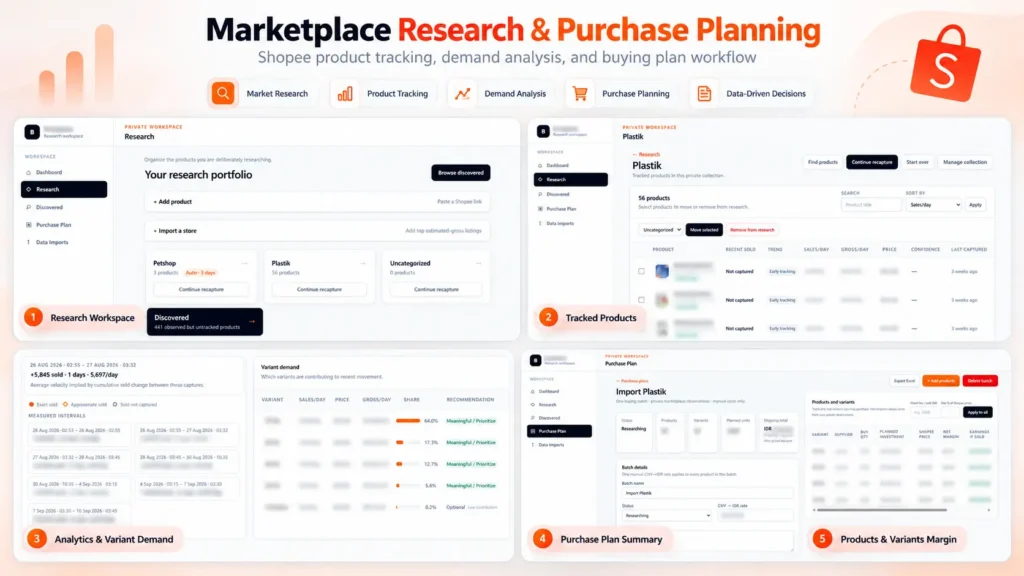
Built a private marketplace research and purchase planning platform for Shopee. The system tracks product performance over time, estimates sales velocity and gross revenue, analyzes demand across product variants, and turns the research into actionable purchasing plans. It also calculates supplier costs, shipping, platform fees, margins, planned investment, and estimated earnings to support data-driven sourcing decisions.

Skills and deliverables

Full-Stack Development, Web Application Development, Data Analysis, Business Process Automation, Business Intelligence

Shopee Marketplace Research & Purchase Planning Dashboard

We built this application to solve a common problem in marketplace sourcing: finding products is easy, but deciding what is actually worth buying, which variant to prioritize, and how much inventory to purchase requires much more analysis. Instead of relying on a single product snapshot, the system organizes products into research collections and tracks their marketplace performance over time.

Product research & tracking

Products can be added individually or collected from marketplace stores and organized into dedicated research collections. The system keeps historical observations so users can compare changes between captures instead of relying only on the latest marketplace data. This makes it possible to estimate metrics such as: – Sales velocity – Estimated daily gross revenue – Price changes – Product movement over time – Variant-level demand

Variant demand analysis

One of the most important parts of the system is identifying which variants are actually driving sales. Instead of treating a product as a single item, the application analyzes sales movement at variant level and shows each variant’s contribution to recent demand. This helps identify which sizes, models, or variations should be prioritized when purchasing inventory.

Purchase planning

Research data can then be converted directly into a purchasing plan. For every product and variant, the user can enter supplier pricing, shipping costs, purchase quantities, exchange rates, and other operational costs. The system automatically calculates: – Planned inventory investment – Shipping cost – Marketplace/platform fees – Net margin per unit – Net margin percentage – Estimated earnings – Total batch investment This allows purchasing decisions to be evaluated before committing capital.

Why We built it

The goal was to replace a workflow that would normally require multiple spreadsheets, manual marketplace checks, and repeated calculations. The resulting workflow became: Discover products → Track performance → Analyze demand → Select variants → Plan purchasing → Estimate margins Everything is kept in one application, making the research and sourcing process easier to review, repeat, and scale.

Result

The platform turns raw marketplace observations into actionable purchasing information. Instead of choosing products based only on intuition or current sales numbers, users can evaluate sales movement, variant demand, sourcing cost, expected margin, and required investment before making a purchasing decision. Built as an end-to-end internal tool, from data collection and analysis to the final purchasing workflow.

Project description.

Built a browser-based tool that converts Shopee/SPX order exports into clean, print-ready shipping labels. It supports multiple Excel/CSV files, combines orders into one preview, and automatically generates QR codes, barcodes, tracking numbers, and product information for 68 mm thermal printers. All order data is processed locally in the browser for better privacy, eliminating repetitive manual label formatting.

Skills and deliverables

Laravel, Business Automation, CSV, Microsoft Excel

Shopee SPX Order Label Maker for Thermal Printing

This tool was built to simplify the shipping label preparation process for Shopee SPX orders. The existing workflow required order data to be exported from Shopee and manually formatted before it could be printed on a thermal printer. This became repetitive and time-consuming, especially when processing multiple orders at once.

We built a browser-based label generator that reads Shopee Excel/CSV exports and automatically converts the order data into clean, print-ready SPX labels. The tool automatically handles: – Tracking numbers – QR codes – Barcodes – Product names and variants – Order quantities – Multiple order files at once – 68 mm thermal printer formatting Users can review all generated labels before printing, without having to manually copy or reorganize the order information.

The order files are processed directly inside the browser instead of being uploaded to a server. This keeps customer and shipment data private while also making the tool fast and simple to use.