If you’ve ever had to write onboarding guides, software documentation, or internal training manuals, you know how time-consuming the process can be. Taking screenshots, cropping images, numbering steps, and updating documentation every time the interface changes quickly becomes tedious.
That’s where Tango comes in.
Tango is a documentation tool that automatically captures your workflow while you perform it. Instead of manually writing every instruction, Tango records each click, generates annotated screenshots, and produces a polished step-by-step guide that you can edit and share.
Whether you’re documenting an Odoo customization, creating customer onboarding materials, or writing internal SOPs, Tango can dramatically reduce the amount of time spent creating documentation.
What Is Tango?
Tango is a browser extension and desktop application that records your actions as you complete a task.
Instead of thinking about documentation first, you simply perform the task normally. Tango observes your workflow and automatically generates:
- Step-by-step instructions
- Annotated screenshots
- Click indicators
- Highlighted interface elements
- A shareable guide
The result looks similar to documentation that would normally take an hour to create, but can often be generated in just a few minutes.
Why Use Tango?
Traditional documentation usually involves several repetitive tasks:
- Taking screenshots
- Cropping and resizing images
- Adding arrows and annotations
- Writing instructions
- Organizing everything into a document
Whenever the application changes, the process often has to be repeated.
Tango automates most of this work.
Some of its biggest advantages include:
- Automatic screenshot capture
- Automatic step generation
- Consistent formatting
- Easy editing after recording
- Shareable documentation links
- Export to PDF or other formats
For teams that frequently create guides, this can save a significant amount of time.
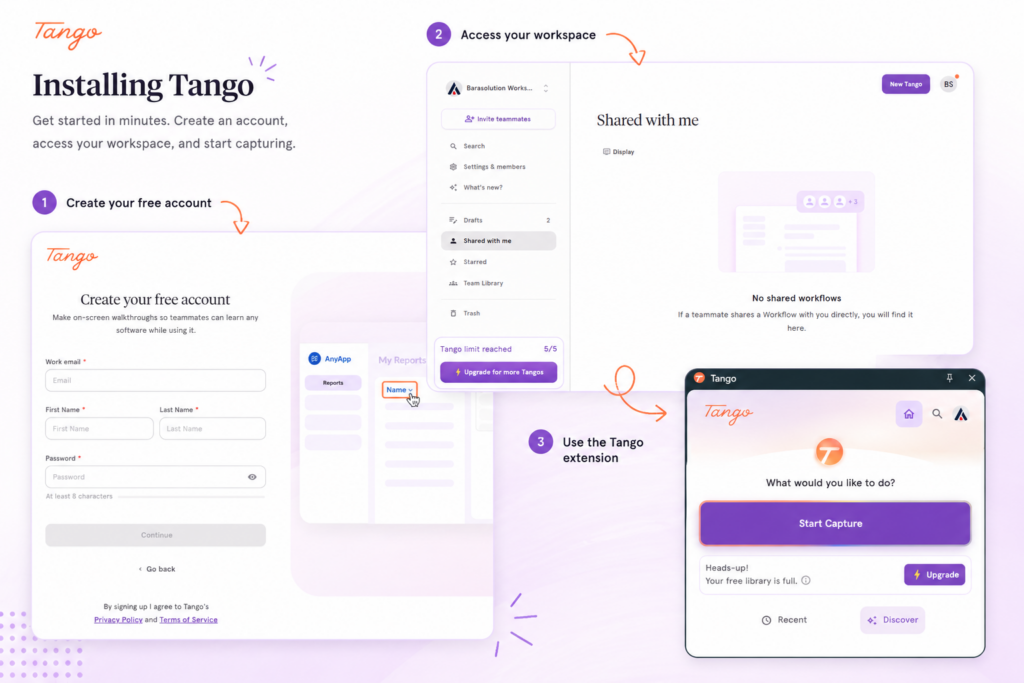
Installing Tango
Getting started only takes a few minutes.
- Create a Tango account.
- Install the Tango browser extension or desktop application.
- Sign in.
- Open the application you want to document.
Once installed, you’re ready to start recording.
Recording Your First Guide
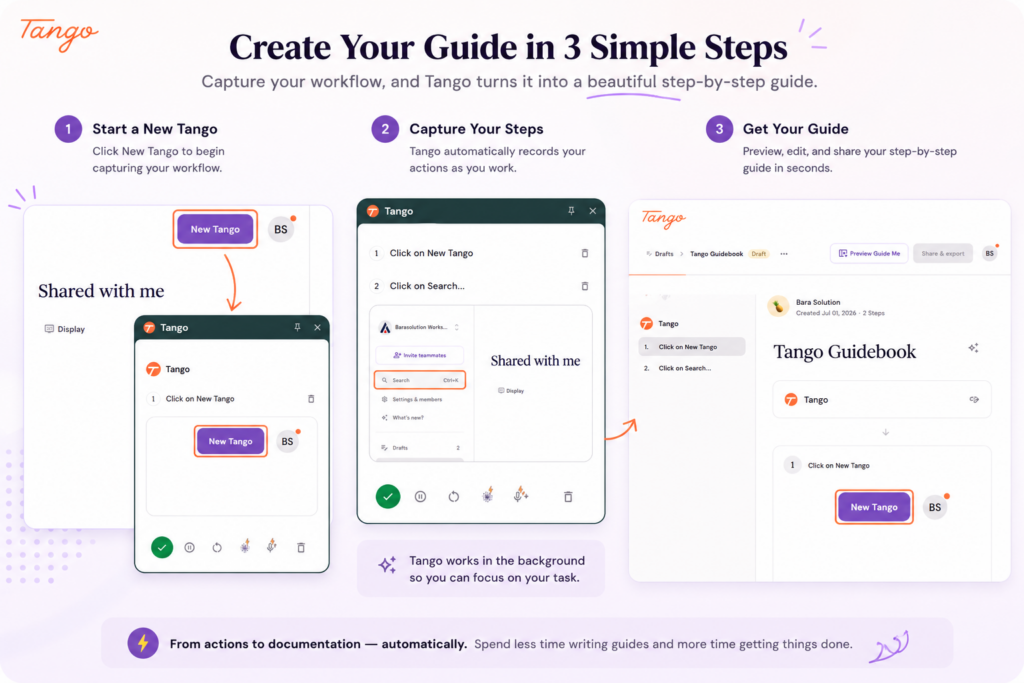
Creating documentation is surprisingly simple.
Step 1: Start Recording
Click the Tango extension or desktop recorder and select Capture Workflow.
Tango will begin monitoring your actions.
Step 2: Perform the Task Normally
Now simply complete the workflow exactly as you normally would.
For example:
- Log into your application
- Navigate through menus
- Fill out forms
- Click buttons
- Save your changes
There’s no need to pause and take screenshots manually.
Step 3: Stop Recording
When you’re finished, stop the recording.
Within seconds, Tango generates a complete guide containing:
- Numbered steps
- Screenshots
- Highlighted clicks
- Written descriptions
Most of the documentation is already finished.
Editing the Generated Guide
Although Tango generates documentation automatically, you still have full control over the final result.
You can:
- Rename steps
- Rewrite descriptions
- Delete unnecessary actions
- Reorder steps
- Add notes or warnings
- Insert additional images
- Include links or supporting resources
This makes it easy to polish the guide before sharing it with others.
Sharing Your Documentation
Once you’re satisfied with the guide, Tango offers several ways to distribute it.
You can:
- Share a public link
- Keep it private within your organization
- Export it as a PDF
- Embed it into knowledge bases
- Copy it into documentation platforms like Confluence or Notion
This flexibility allows the same guide to be reused across multiple teams.
Summary
Creating high-quality documentation doesn’t have to involve dozens of screenshots and hours of editing.
With Tango, you simply perform a task once, and the tool automatically generates a professional-looking guide complete with screenshots, annotations, and step-by-step instructions. You can then review, refine, and share it with your team or customers in just a few clicks.
For developers, IT teams, trainers, and business users alike, Tango is an excellent way to standardize documentation while dramatically reducing the effort required to produce it. If documenting processes is part of your workflow, it’s a tool well worth adding to your toolkit.