
3 Filament Features I Wish I Knew About Sooner

When I started building admin panels with Filament, I did what most beginners do: I made a Resource, filled in the form fields, and called it done. It worked, but it also meant I was writing a lot of extra code for things Filament could already handle for me.

Here are three features that quietly made my Laravel admin panels look and feel more professional, without much extra effort.

Relation Managers: Stop Building Separate CRUD Pages

Say you have a Lecturer resource, and each lecturer has many Students. The beginner move is to build a whole separate CRUD interface for managing students with its own resource, its own routes, its own everything.

Filament’s Relation Managers solve this. You can manage the related model directly inside the parent resource’s edit page.

public static function getRelations(): array
{
    return [
        RelationManagers\StudentsRelationManager::class,
    ];
}

Inside the relation manager class, you define the table and form just like you would for a regular resource:

public function table(Table $table): Table
{
    return $table
        ->columns([
            Tables\Columns\TextColumn::make('name'),
            Tables\Columns\TextColumn::make('email'),
        ])
        ->headerActions([
            Tables\Actions\CreateAction::make(),
        ]);
}

Now, when you open a lecturer’s edit page, there’s a tab showing all their students with create, edit, and delete actions built in. No separate pages, no extra routes, no duplicated logic.

Custom Actions With Confirmation Modals

Buttons that do something destructive or important like approving a submission or rejecting a request should always ask “are you sure?” first. Building that confirmation modal yourself usually means extra Livewire components or JS logic.

Filament gives you this for free with Action::make() and ->requiresConfirmation():

Tables\Actions\Action::make('approve')
    ->label('Approve')
    ->icon('heroicon-o-check-circle')
    ->color('success')
    ->requiresConfirmation()
    ->action(function ($record) {
        $record->update(['status' => 'approved']);
    });

That’s it. Clicking the button pops up a modal asking the user to confirm, and only runs the action() closure if they say yes. You can customize the modal heading, description, and even require the user to type something before confirming which is useful for irreversible actions like deleting records.

The Notifications API: Toasts With Almost No Code

Every app needs feedback “Saved successfully,” “Something went wrong,” and so on. Instead of writing your own toast component, Filament ships with a clean Notifications API:

Notification::make()
    ->title('Approved successfully')
    ->success()
    ->send();

Drop this inside any action, form submission, or event, and you get a polished, animated notification; no CSS, no JS, no extra package. There’s also ->warning(), ->danger(), and ->info() for different states, plus support for actions and persistent notifications if you need something more advanced.

Small Features, Big Payoff

None of these are complicated once you know they exist and that’s exactly the problem. They’re easy to miss if you’re just following the basic tutorial. But once you start using relation managers, confirmation modals, and the notifications API together, your admin panel starts feeling like a real, polished product instead of a bare CRUD scaffold.

If you’re building anything in Filament right now, I’d bet at least one of these three can replace something you’re currently doing the hard way.
Book a Free Consultation

Haven’t found the right solution yet?
Tell us about your needs, and let’s discuss the best solution together.

Project description.

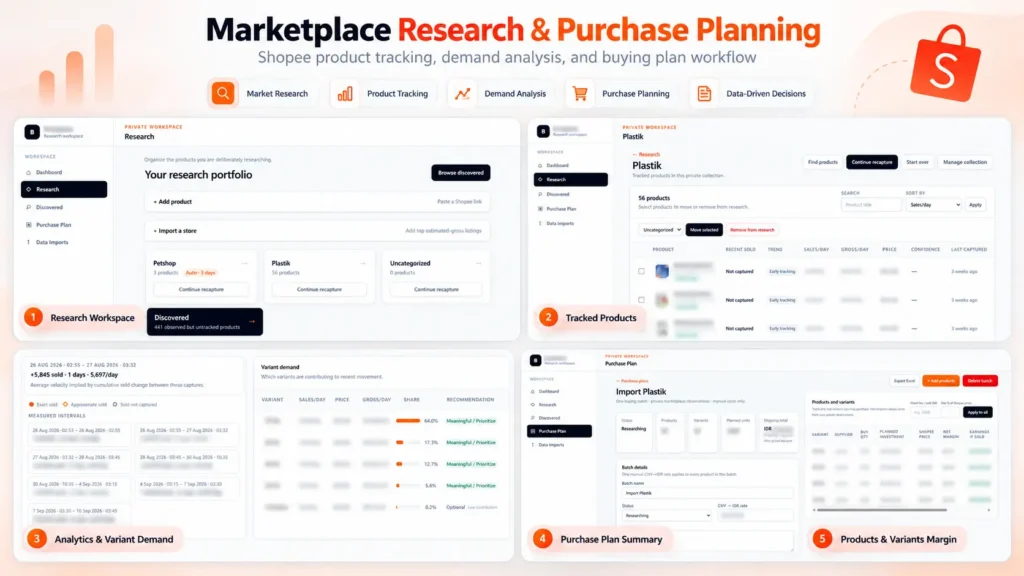
Built a private marketplace research and purchase planning platform for Shopee. The system tracks product performance over time, estimates sales velocity and gross revenue, analyzes demand across product variants, and turns the research into actionable purchasing plans. It also calculates supplier costs, shipping, platform fees, margins, planned investment, and estimated earnings to support data-driven sourcing decisions.

Skills and deliverables

Full-Stack Development, Web Application Development, Data Analysis, Business Process Automation, Business Intelligence

Shopee Marketplace Research & Purchase Planning Dashboard

We built this application to solve a common problem in marketplace sourcing: finding products is easy, but deciding what is actually worth buying, which variant to prioritize, and how much inventory to purchase requires much more analysis. Instead of relying on a single product snapshot, the system organizes products into research collections and tracks their marketplace performance over time.

Product research & tracking

Products can be added individually or collected from marketplace stores and organized into dedicated research collections. The system keeps historical observations so users can compare changes between captures instead of relying only on the latest marketplace data. This makes it possible to estimate metrics such as: – Sales velocity – Estimated daily gross revenue – Price changes – Product movement over time – Variant-level demand

Variant demand analysis

One of the most important parts of the system is identifying which variants are actually driving sales. Instead of treating a product as a single item, the application analyzes sales movement at variant level and shows each variant’s contribution to recent demand. This helps identify which sizes, models, or variations should be prioritized when purchasing inventory.

Purchase planning

Research data can then be converted directly into a purchasing plan. For every product and variant, the user can enter supplier pricing, shipping costs, purchase quantities, exchange rates, and other operational costs. The system automatically calculates: – Planned inventory investment – Shipping cost – Marketplace/platform fees – Net margin per unit – Net margin percentage – Estimated earnings – Total batch investment This allows purchasing decisions to be evaluated before committing capital.

Why We built it

The goal was to replace a workflow that would normally require multiple spreadsheets, manual marketplace checks, and repeated calculations. The resulting workflow became: Discover products → Track performance → Analyze demand → Select variants → Plan purchasing → Estimate margins Everything is kept in one application, making the research and sourcing process easier to review, repeat, and scale.

Result

The platform turns raw marketplace observations into actionable purchasing information. Instead of choosing products based only on intuition or current sales numbers, users can evaluate sales movement, variant demand, sourcing cost, expected margin, and required investment before making a purchasing decision. Built as an end-to-end internal tool, from data collection and analysis to the final purchasing workflow.

Project description.

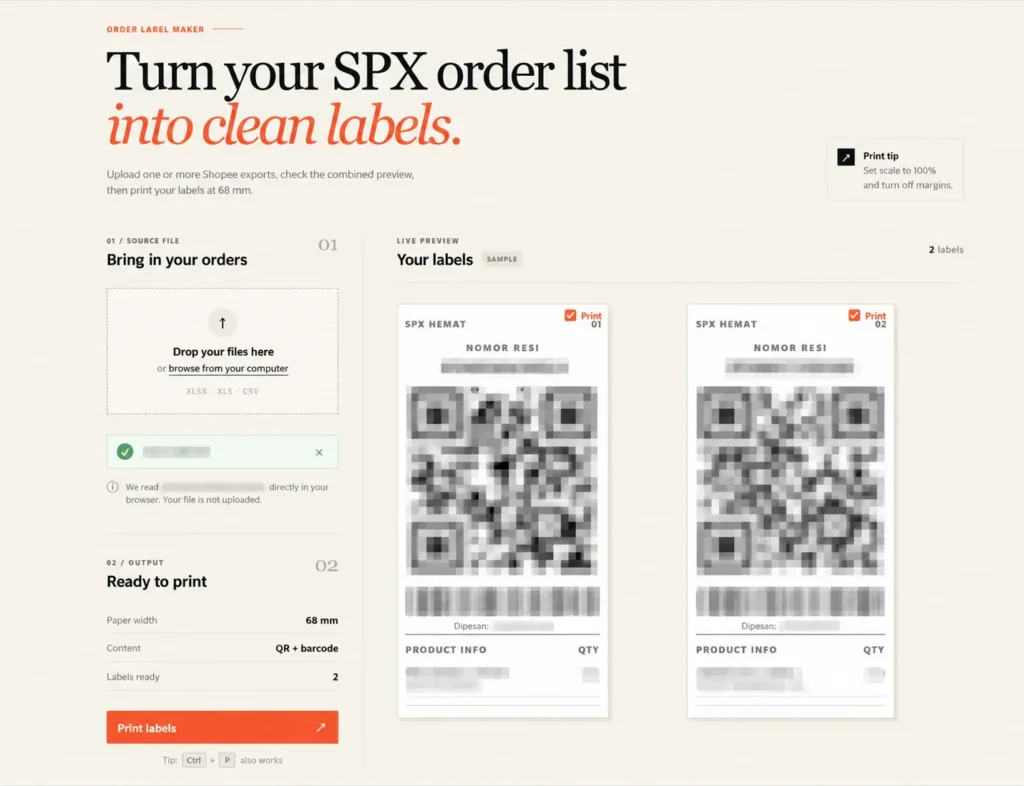
Built a browser-based tool that converts Shopee/SPX order exports into clean, print-ready shipping labels. It supports multiple Excel/CSV files, combines orders into one preview, and automatically generates QR codes, barcodes, tracking numbers, and product information for 68 mm thermal printers. All order data is processed locally in the browser for better privacy, eliminating repetitive manual label formatting.

Skills and deliverables

Laravel, Business Automation, CSV, Microsoft Excel

Shopee SPX Order Label Maker for Thermal Printing

This tool was built to simplify the shipping label preparation process for Shopee SPX orders. The existing workflow required order data to be exported from Shopee and manually formatted before it could be printed on a thermal printer. This became repetitive and time-consuming, especially when processing multiple orders at once.

We built a browser-based label generator that reads Shopee Excel/CSV exports and automatically converts the order data into clean, print-ready SPX labels. The tool automatically handles: – Tracking numbers – QR codes – Barcodes – Product names and variants – Order quantities – Multiple order files at once – 68 mm thermal printer formatting Users can review all generated labels before printing, without having to manually copy or reorganize the order information.

The order files are processed directly inside the browser instead of being uploaded to a server. This keeps customer and shipment data private while also making the tool fast and simple to use.