
What a reverse proxy does?
- Sits in front of one or more backend apps/services, forwards incoming requests to the right one based on domain, path, or port
- Client only ever talks to the proxy. Backend processes never need to be exposed directly to the internet
So why do we need reverse proxy?
- Single entry point on port 80/443 instead of exposing each app on its own raw port
- TLS/SSL termination handled in one place instead of configuring it per app
- Can route multiple apps or services through one server, each reachable by its own domain or subdomain
- Backend ports stay closed to the outside world, only reachable from the proxy itself (localhost)
Architecture
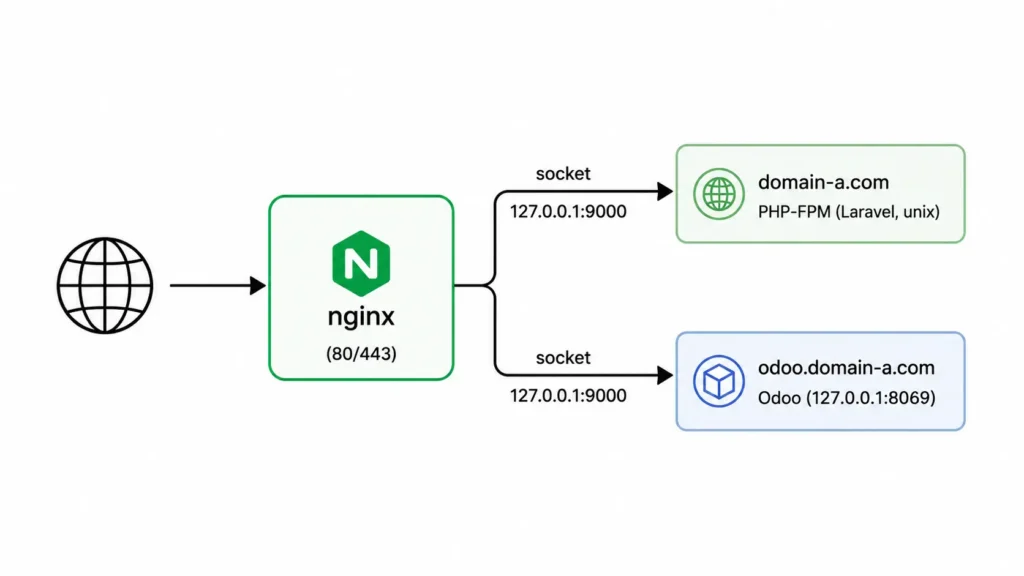
Each backend binds only to localhost/127.0.0.1, nginx is the only process exposed externally
Core config structure
- One
serverblock per domain/app, distinguished byserver_name locationblock(s) inside each, matching the paths to forwardproxy_passdirective pointing at the backend address (http://127.0.0.1:PORT)
Headers worth setting on proxied requests, and why
Host: passes the original requested domain through to the backendX-Real-IP: preserves the actual client IP (otherwise every request looks like it came from the proxy itself)X-Forwarded-For: chain of IPs if there are multiple proxies/hopsX-Forwarded-Proto: tells the backend whether the original request was http or https. Without this, an app can generate broken redirect URLs (redirecting to http even when the client is on https)
The problem
- Symptom: everything works through the proxy except a feature relying on a persistent connection (live chat, real-time notifications, websockets). It loads fine, then silently stops updating
- Why: nginx doesn’t forward the
UpgradeandConnectionheaders by default, so the backend never sees the HTTP upgrade request that starts a WebSocket connection. The connection quietly falls back or fails - Fix: add these two lines inside the relevant
locationblock
proxy_http_version 1.1;
proxy_set_header Upgrade $http_upgrade;
proxy_set_header Connection "upgrade";
Example config file
server {
    listen 80;
    server_name app-two.example.com;

    location / {
        proxy_pass http://127.0.0.1:8080;
        proxy_set_header Host $host;
        proxy_set_header X-Real-IP $remote_addr;
        proxy_set_header X-Forwarded-For $proxy_add_x_forwarded_for;
        proxy_set_header X-Forwarded-Proto $scheme;
        proxy_redirect off;
    }
}
What actually makes this a reverse proxy
Compare it to a plain nginx server block that just serves static files or hands off to PHP-FPM directly. What’s different here, and what each piece is doing:
proxy_pass http://127.0.0.1:8080;: this is the one line that defines it. Instead of nginx serving a file or handing off to a local process handler (like fastcgi_pass for PHP), it forwards the entire request to a separate running service and relays that service’s response back to the client. Nginx isn’t the thing answering the request, it’s relaying to something else that is.proxy_set_headerlines: not strictly required for the proxy to function (it would forward requests without them), but required for the backend app to behave correctly. Without them the backend sees every request as if it came from nginx itself, on the wrong protocol, with no idea what domain was actually requested.- No
rootortry_filesdirective: a static/PHP-serving block needs those to find files on disk. A reverse proxy block doesn’t touch the filesystem at all, everything afterproxy_passis the other service’s job. - The backend address is
127.0.0.1, not0.0.0.0or a public IP: the backend only needs to be reachable from nginx itself, not from the internet directly.
If a config has proxy_pass pointing at another address, that’s the defining trait. Everything else (headers, timeouts, buffering settings) is tuning around that core behavior, not what makes it a reverse proxy in the first place.
Takeaway
- If a proxied app has any real-time feature and it stops working only through the proxy (not when hitting the backend directly), check the Upgrade/Connection headers before anything else