
ERP vs Manual Process: Which Saves More Money?

As businesses grow, managing operations manually becomes increasingly difficult. What starts as a simple spreadsheet or paper-based workflow can eventually lead to delays, costly mistakes, and lost opportunities.

This raises an important question:

Is it more cost-effective to continue using manual processes, or invest in an ERP system?

The answer depends on more than just software costs. To make the right decision, businesses should consider the hidden expenses of manual work alongside the long-term benefits of automation.


Understanding Manual Processes

Manual processes rely on spreadsheets, paper documents, phone calls, emails, or disconnected applications to manage daily operations.

Many small businesses begin this way because it’s inexpensive and easy to implement.

Common examples include:

  • Recording sales in Excel
  • Tracking inventory manually
  • Creating invoices by hand
  • Updating stock after each sale
  • Preparing monthly reports manually

While these methods work initially, they become harder to manage as transaction volumes increase.


What Is an ERP System?

An Enterprise Resource Planning (ERP) system integrates multiple business functions into a single platform.

Instead of using separate spreadsheets or software for accounting, inventory, sales, purchasing, and production, everything is connected through one centralized database.

This enables every department to access accurate, real-time information.


Comparing Manual Processes and ERP

Manual ProcessERP System
Duplicate data entrySingle source of truth
High risk of human errorAutomated workflows
Reports created manuallyReal-time dashboards
Difficult collaborationShared information across departments
Limited scalabilityDesigned for business growth
Time-consuming approvalsAutomated approval workflows

The Hidden Costs of Manual Processes

Many business owners believe manual systems are “free” because they don’t require software subscriptions.

In reality, manual work often creates hidden costs that accumulate over time.

1. Human Errors

Typing mistakes, duplicate entries, and incorrect calculations can result in:

  • Incorrect invoices
  • Inventory discrepancies
  • Financial reporting errors
  • Customer complaints

Correcting these mistakes consumes valuable employee time and may even damage customer trust.


2. Lost Productivity

Employees spend hours every week on repetitive administrative tasks such as:

  • Copying data between spreadsheets
  • Searching for documents
  • Creating reports
  • Updating inventory records

Those hours could instead be used for sales, customer service, or strategic planning.


3. Poor Decision Making

Without real-time data, managers often make decisions based on outdated information.

This can lead to:

  • Overstocking
  • Stock shortages
  • Delayed purchasing
  • Cash flow issues

4. Limited Growth

Manual systems may work for a small team, but they quickly become difficult to manage as a business expands.

Adding more employees often increases complexity instead of improving efficiency.


How an ERP System Saves Money

Although implementing an ERP requires an upfront investment, it can reduce operational costs over the long term.

Reduce Administrative Work

Automation eliminates repetitive tasks such as:

  • Invoice generation
  • Purchase approvals
  • Inventory updates
  • Financial reporting

Employees spend less time on paperwork and more time creating value.


Reduce Costly Errors

ERP systems validate data automatically and keep all departments working from the same information.

This significantly reduces mistakes caused by duplicate or inconsistent records.


Improve Inventory Management

Real-time inventory tracking helps businesses:

  • Avoid overstocking
  • Prevent stockouts
  • Reduce warehouse costs
  • Improve order fulfillment

Better Business Decisions

With dashboards and real-time reports, business owners can quickly monitor:

  • Sales performance
  • Profit margins
  • Inventory levels
  • Cash flow
  • Purchasing trends

Better visibility leads to faster and more informed decisions.


Which Businesses Benefit Most from ERP?

ERP systems are especially valuable for businesses that:

  • Handle a large number of daily transactions
  • Manage inventory
  • Operate multiple branches
  • Have several departments
  • Need accurate financial reporting
  • Plan to scale operations

Final Thoughts

While manual processes may seem less expensive initially, they often generate hidden costs through inefficiency, errors, and lost productivity.

An ERP system requires investment, but it helps businesses reduce operational expenses, improve accuracy, and support long-term growth.

If your team spends more time managing spreadsheets than growing the business, it may be the right time to consider an ERP solution.
Book a Free Consultation

Haven’t found the right solution yet?
Tell us about your needs, and let’s discuss the best solution together.

Project description.

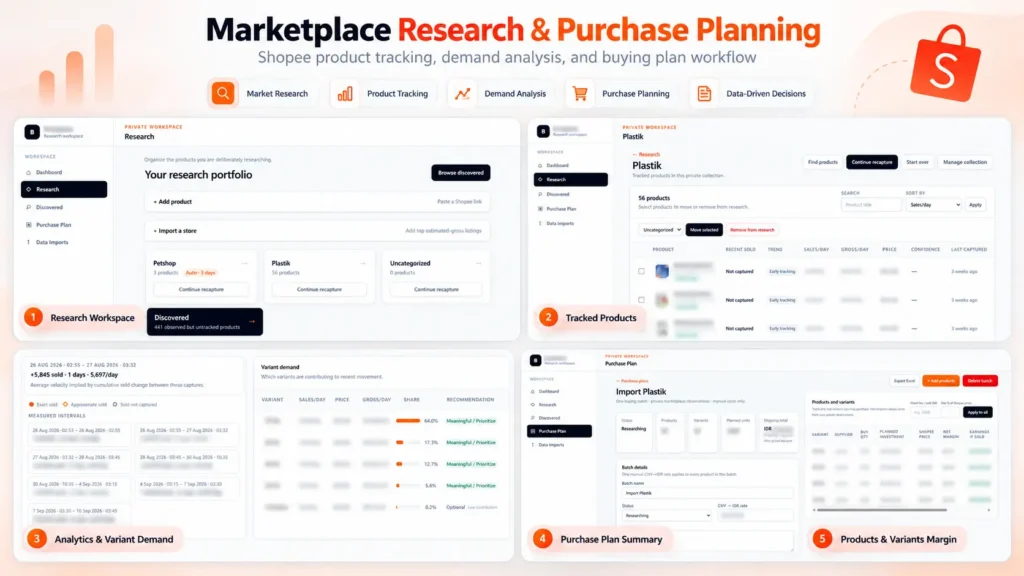
Built a private marketplace research and purchase planning platform for Shopee. The system tracks product performance over time, estimates sales velocity and gross revenue, analyzes demand across product variants, and turns the research into actionable purchasing plans. It also calculates supplier costs, shipping, platform fees, margins, planned investment, and estimated earnings to support data-driven sourcing decisions.

Skills and deliverables

Full-Stack Development, Web Application Development, Data Analysis, Business Process Automation, Business Intelligence

Shopee Marketplace Research & Purchase Planning Dashboard

We built this application to solve a common problem in marketplace sourcing: finding products is easy, but deciding what is actually worth buying, which variant to prioritize, and how much inventory to purchase requires much more analysis. Instead of relying on a single product snapshot, the system organizes products into research collections and tracks their marketplace performance over time.

Product research & tracking

Products can be added individually or collected from marketplace stores and organized into dedicated research collections. The system keeps historical observations so users can compare changes between captures instead of relying only on the latest marketplace data. This makes it possible to estimate metrics such as: – Sales velocity – Estimated daily gross revenue – Price changes – Product movement over time – Variant-level demand

Variant demand analysis

One of the most important parts of the system is identifying which variants are actually driving sales. Instead of treating a product as a single item, the application analyzes sales movement at variant level and shows each variant’s contribution to recent demand. This helps identify which sizes, models, or variations should be prioritized when purchasing inventory.

Purchase planning

Research data can then be converted directly into a purchasing plan. For every product and variant, the user can enter supplier pricing, shipping costs, purchase quantities, exchange rates, and other operational costs. The system automatically calculates: – Planned inventory investment – Shipping cost – Marketplace/platform fees – Net margin per unit – Net margin percentage – Estimated earnings – Total batch investment This allows purchasing decisions to be evaluated before committing capital.

Why We built it

The goal was to replace a workflow that would normally require multiple spreadsheets, manual marketplace checks, and repeated calculations. The resulting workflow became: Discover products → Track performance → Analyze demand → Select variants → Plan purchasing → Estimate margins Everything is kept in one application, making the research and sourcing process easier to review, repeat, and scale.

Result

The platform turns raw marketplace observations into actionable purchasing information. Instead of choosing products based only on intuition or current sales numbers, users can evaluate sales movement, variant demand, sourcing cost, expected margin, and required investment before making a purchasing decision. Built as an end-to-end internal tool, from data collection and analysis to the final purchasing workflow.

Project description.

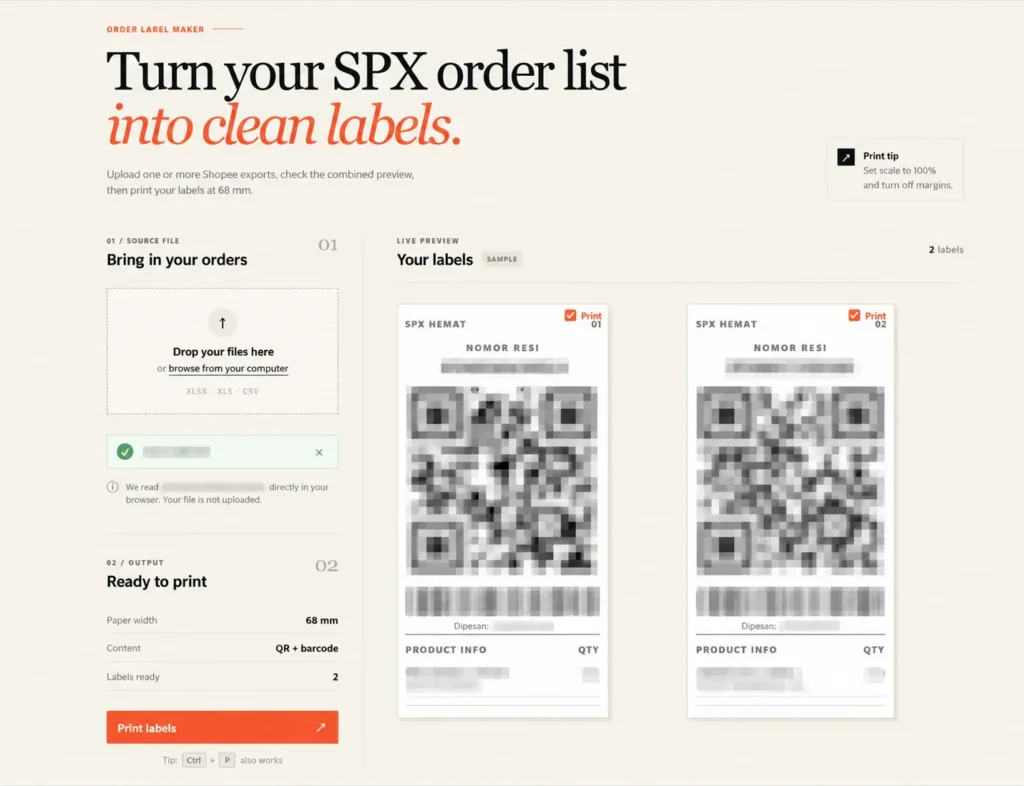
Built a browser-based tool that converts Shopee/SPX order exports into clean, print-ready shipping labels. It supports multiple Excel/CSV files, combines orders into one preview, and automatically generates QR codes, barcodes, tracking numbers, and product information for 68 mm thermal printers. All order data is processed locally in the browser for better privacy, eliminating repetitive manual label formatting.

Skills and deliverables

Laravel, Business Automation, CSV, Microsoft Excel

Shopee SPX Order Label Maker for Thermal Printing

This tool was built to simplify the shipping label preparation process for Shopee SPX orders. The existing workflow required order data to be exported from Shopee and manually formatted before it could be printed on a thermal printer. This became repetitive and time-consuming, especially when processing multiple orders at once.

We built a browser-based label generator that reads Shopee Excel/CSV exports and automatically converts the order data into clean, print-ready SPX labels. The tool automatically handles: – Tracking numbers – QR codes – Barcodes – Product names and variants – Order quantities – Multiple order files at once – 68 mm thermal printer formatting Users can review all generated labels before printing, without having to manually copy or reorganize the order information.

The order files are processed directly inside the browser instead of being uploaded to a server. This keeps customer and shipment data private while also making the tool fast and simple to use.