
Exposing Localhost to the Internet: Using ngrok to Test Midtrans Webhooks

Payment gateway integrations almost always need a real, publicly reachable URL. It can’t use localhost:8000 because the gateway itself calls your server to confirm a payment happened. While building payment handling for my project using Midtrans’s sandbox environment, I hit exactly that wall, and ngrok was the fix.

The Problem

Midtrans (like most payment gateways: Stripe, Xendit, etc) all work the same way by using a server-to-server notification model for payment status. After a customer completes or fails a payment, Midtrans’s servers send an HTTP POST to a notification URL you configure in your Midtrans dashboard. That’s how your app finds out a payment succeeded; it’s not something the browser tells you directly.

The problem happens when Midtrans’s servers are out on the internet. They cannot POST to http://localhost:8000/midtrans/notification, because localhost only means “this machine.” From Midtrans’s servers, that address means nothing. Setting the notification/webhook URL to a localhost address in the sandbox dashboard simply results in failed delivery: no notification ever arrives, and Midtrans logs a connection error on their end. This is a real blocker during local development. You want to test the full payment flow before deploying anywhere, but the webhook literally cannot reach your machine.

The Fix: ngrok

ngrok creates a temporary public URL that tunnels straight to a port on your local machine. Traffic hits the public ngrok URL, and ngrok forwards it to localhost:8000 (or whatever port your app is running on), so from Midtrans’s point of view, they’re calling a completely normal HTTPS domain.

You can see the documentation here: https://ngrok.com

Installing and Setting Up ngrok

Download it, or install via package manager:

# macOS
brew install ngrok

# or download directly from ngrok.com/download and unzip

ngrok requires a free account to run tunnels past the first few minutes of a session. After signing up, connect your auth token once:

ngrok config add-authtoken <your-authtoken-here>

That token is tied to your ngrok account and only needs to be set once per machine.

Running the Tunnel

For exampe with the Laravel or any app you run locally:

php artisan serve --port=8000

Open a separate terminal and start the tunnel:

ngrok http 8000

ngrok would prints something like:

Forwarding    https://[random-subdomain].ngrok-free.app -> http://localhost:8000

That https://[random-subdomain].ngrok-free.app URL is now live on the internet, for as long as this ngrok process keeps running. Closing the terminal, or losing your connection, kills the tunnel and the URL with it.

Inspecting Requests

ngrok runs a local web interface at http://127.0.0.1:4040 while the tunnel is active. This is genuinely the most useful part of the tool for debugging: it shows every request that came through the tunnel, the full headers, and the full body, both what was sent and what your app responded with.

For a webhook integration like the Midtrans notification, this is how you check whether a bug is on your side (bad handler logic) or on the payload side (unexpected field, different structure than expected), without needing to add print statements or log lines just to see what arrived.

Pointing the Notification URL at the Tunnel

In the Midtrans sandbox dashboard, the Payment Notification URL gets set to the ngrok address plus your route:

https://[random-subdomain].ngrok-free.app/midtrans/notification

Triggering a sandbox payment now actually reaches the local route, visible both in the ngrok inspector and in the app’s own logs.

What to Watch Out For

  • The free ngrok URL changes every time you restart the tunnel. That means re-pasting the URL into whatever dashboard needs it each session. Annoying, but fine for development. A paid plan gives a fixed subdomain if this gets tedious.
  • This is a development workaround, not a deployment strategy. In production, the callback URL should point at the actual deployed domain. ngrok is only for local testing before a real server exists to point at.
  • The tunnel is only as available as your own machine. If your laptop sleeps or loses network, the webhook stops arriving, silently, with no error on your side until you notice nothing came through.

Takeaway

Any integration that calls back into your server from the outside (webhooks, OAuth redirects, most third-party callbacks) needs a real reachable URL, and localhost fundamentally can’t satisfy that from an external server’s perspective. ngrok closes that gap for local development without needing a deployed server just to test a callback.
Book a Free Consultation

Haven’t found the right solution yet?
Tell us about your needs, and let’s discuss the best solution together.

Project description.

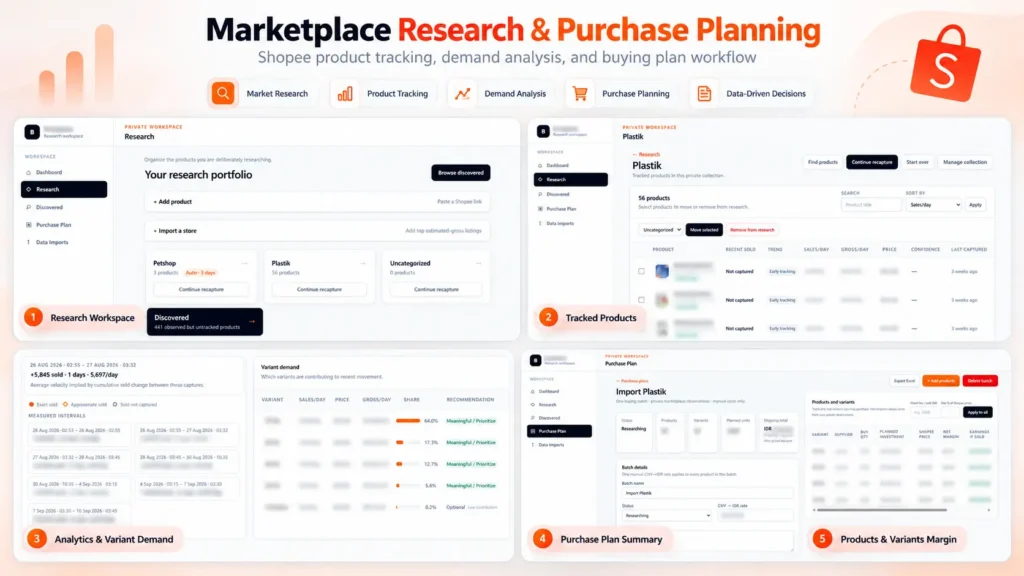
Built a private marketplace research and purchase planning platform for Shopee. The system tracks product performance over time, estimates sales velocity and gross revenue, analyzes demand across product variants, and turns the research into actionable purchasing plans. It also calculates supplier costs, shipping, platform fees, margins, planned investment, and estimated earnings to support data-driven sourcing decisions.

Skills and deliverables

Full-Stack Development, Web Application Development, Data Analysis, Business Process Automation, Business Intelligence

Shopee Marketplace Research & Purchase Planning Dashboard

We built this application to solve a common problem in marketplace sourcing: finding products is easy, but deciding what is actually worth buying, which variant to prioritize, and how much inventory to purchase requires much more analysis. Instead of relying on a single product snapshot, the system organizes products into research collections and tracks their marketplace performance over time.

Product research & tracking

Products can be added individually or collected from marketplace stores and organized into dedicated research collections. The system keeps historical observations so users can compare changes between captures instead of relying only on the latest marketplace data. This makes it possible to estimate metrics such as: – Sales velocity – Estimated daily gross revenue – Price changes – Product movement over time – Variant-level demand

Variant demand analysis

One of the most important parts of the system is identifying which variants are actually driving sales. Instead of treating a product as a single item, the application analyzes sales movement at variant level and shows each variant’s contribution to recent demand. This helps identify which sizes, models, or variations should be prioritized when purchasing inventory.

Purchase planning

Research data can then be converted directly into a purchasing plan. For every product and variant, the user can enter supplier pricing, shipping costs, purchase quantities, exchange rates, and other operational costs. The system automatically calculates: – Planned inventory investment – Shipping cost – Marketplace/platform fees – Net margin per unit – Net margin percentage – Estimated earnings – Total batch investment This allows purchasing decisions to be evaluated before committing capital.

Why We built it

The goal was to replace a workflow that would normally require multiple spreadsheets, manual marketplace checks, and repeated calculations. The resulting workflow became: Discover products → Track performance → Analyze demand → Select variants → Plan purchasing → Estimate margins Everything is kept in one application, making the research and sourcing process easier to review, repeat, and scale.

Result

The platform turns raw marketplace observations into actionable purchasing information. Instead of choosing products based only on intuition or current sales numbers, users can evaluate sales movement, variant demand, sourcing cost, expected margin, and required investment before making a purchasing decision. Built as an end-to-end internal tool, from data collection and analysis to the final purchasing workflow.

Project description.

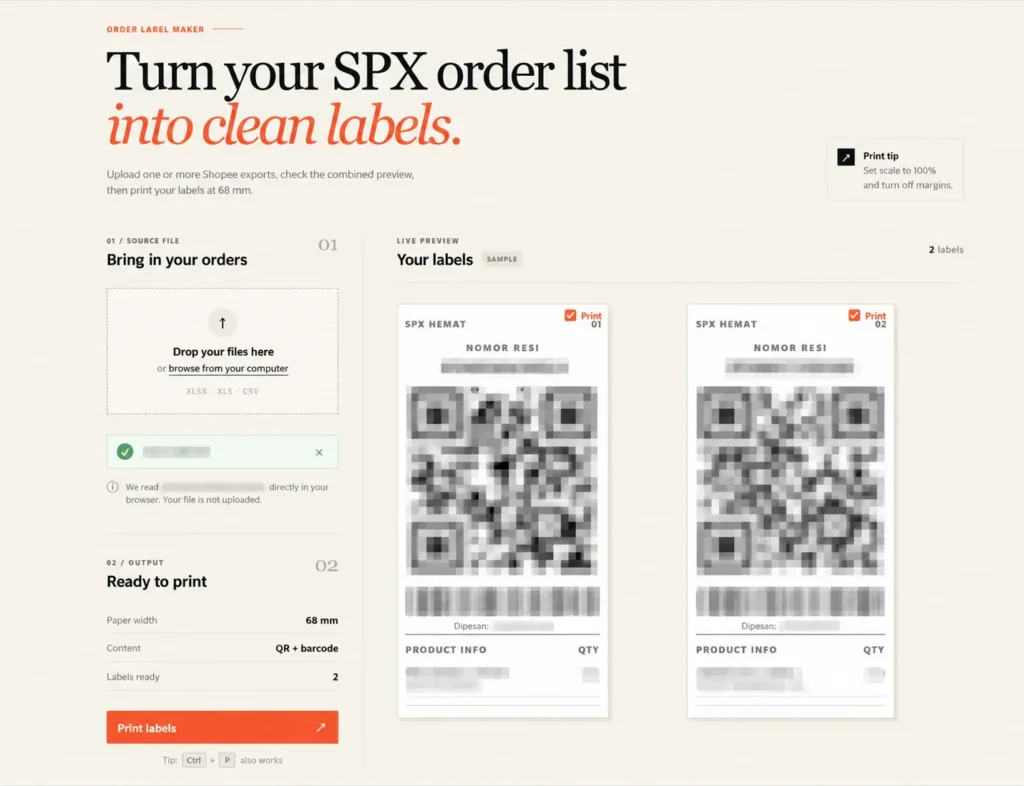
Built a browser-based tool that converts Shopee/SPX order exports into clean, print-ready shipping labels. It supports multiple Excel/CSV files, combines orders into one preview, and automatically generates QR codes, barcodes, tracking numbers, and product information for 68 mm thermal printers. All order data is processed locally in the browser for better privacy, eliminating repetitive manual label formatting.

Skills and deliverables

Laravel, Business Automation, CSV, Microsoft Excel

Shopee SPX Order Label Maker for Thermal Printing

This tool was built to simplify the shipping label preparation process for Shopee SPX orders. The existing workflow required order data to be exported from Shopee and manually formatted before it could be printed on a thermal printer. This became repetitive and time-consuming, especially when processing multiple orders at once.

We built a browser-based label generator that reads Shopee Excel/CSV exports and automatically converts the order data into clean, print-ready SPX labels. The tool automatically handles: – Tracking numbers – QR codes – Barcodes – Product names and variants – Order quantities – Multiple order files at once – 68 mm thermal printer formatting Users can review all generated labels before printing, without having to manually copy or reorganize the order information.

The order files are processed directly inside the browser instead of being uploaded to a server. This keeps customer and shipment data private while also making the tool fast and simple to use.